 Cued
Cued
How to read notes on a video call without looking away
By Harshit Maurya, maker of Cued · Updated 16 October 2026
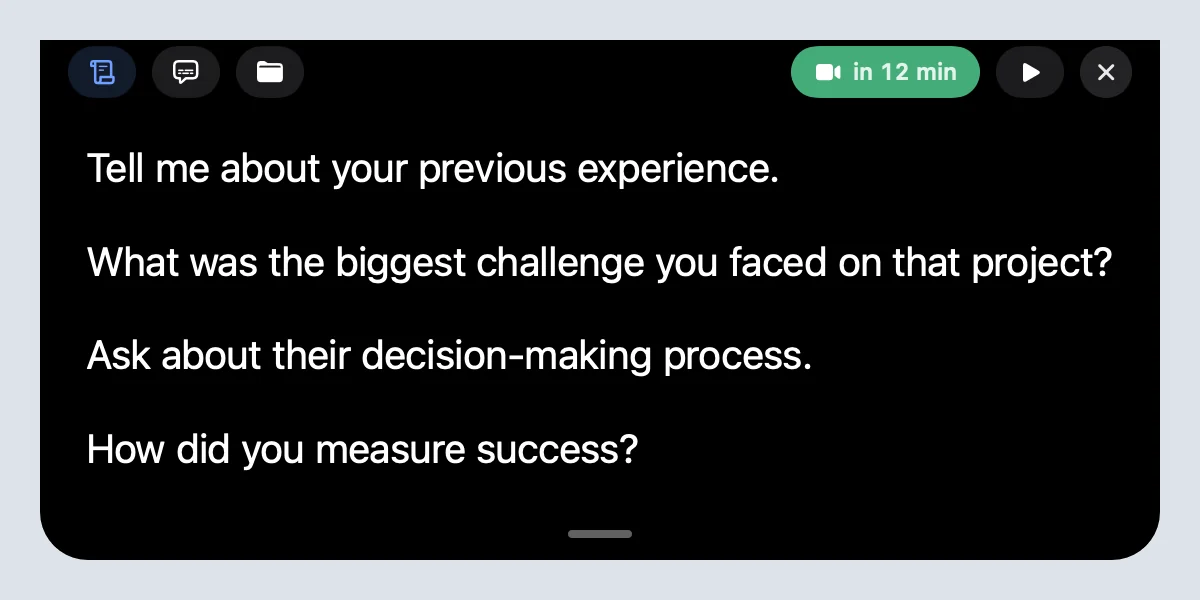
Put your notes as close to the camera as you can, within about 15 degrees of the lens, and write them as short chunks of five to seven words so one glance is enough. You can do this for free by moving the call window and your notes to the top of the screen. On a MacBook, a notch teleprompter like Cued shows your notes beside the camera, scrolls them for you and hides them from screen sharing.
Why your eyes give you away
People notice when your gaze drops below the camera. What shows is the angle between the lens and your notes, so the fix is to shrink that angle. Teleprompter.com's guide gives a working rule: keep the text within roughly 15 degrees of the lens, because wider than that reads as looking away.
The second thing that shows is how long you look. A long paragraph keeps your eyes down for several seconds and makes your voice flatten into reading. A short line you can take in at a glance does not.
Where to put your notes on the screen
- Best: right under the camera, at the top centre of the screen. On a MacBook that is the notch.
- Good: in a narrow strip along the top edge, under the camera.
- Poor: beside the call window, halfway down the screen.
- Worst: on a second monitor or on paper on the desk. Your whole head turns, not just your eyes.
Move the call window up too. The face you are talking to should sit just below the camera, so that looking at them, at your notes and at the lens are almost the same thing.
How to write notes you can read at a glance
- Five to seven words per line. Teleprompter.com recommends 5 to 7 word chunks with breath breaks between them.
- Talking points, not a script. Elgato's advice for its Prompter is the same: bullet points keep you on track without locking you into sentences.
- Start each line with the word you would say first.
- Mark numbers, names and prices so they stand out.
- Keep the questions you want to ask as their own lines.
An example, for the start of a client call: 'Thanks for making time today' / 'Goal: agree scope and a date' / 'Recap: 3 screens, launch in May' / 'Ask: who signs off?' / 'Budget question last'. Five lines, one glance each.
Five ways to do it, free to paid
- Move the call window up. Drag the video call to the top of the screen, just under the camera, and keep your notes in a narrow window beside the faces. Free, but the notes are still away from the lens.
- Hide your own video. Zoom: Hide Self View. Google Meet: Remove this tile. Teams: Hide me. Your face stops pulling your eyes to the middle of the screen; the others still see you.
- Use a sticky note window near the camera. A small floating notes window at the top centre helps, but it shows up when you share your whole screen unless the app hides it.
- Use a teleprompter app. A teleprompter scrolls your notes for you. Choose one that is hidden from screen sharing.
- Use the notch on a MacBook. Cued puts the teleprompter in the notch itself, beside the camera, and adds recording, transcripts and a summary of the call.
How to practise before the call
- Read your notes out loud once. Cut any line you stumble on.
- Start a test call with yourself, or record a short clip with the call app, and watch where your eyes go.
- If you still look down, move the notes higher or make the lines shorter.
- Check what others see when you share your screen, before the real call.
Where to look when you're not reading
Notes are for the moments you speak. When the other person talks, look at their face; that is what listening looks like on a call. When you make your main point or ask a question, look into the lens for that sentence. Glance at the next line while they answer, so you are ready when it is your turn. That rhythm, reading in the pauses and looking up for the important lines, is what makes notes invisible.
If you lose your place
Stop reading and talk. Short notes make this easy: each line is one idea, so you can find the next one in a second. In Cued, point at the notch to hold the text still, or use the arrow keys to jump to the next prompt. Saying 'let me check my notes' is also fine; most people take notes to calls.
Questions
Is it okay to read notes on a video call?
Yes. Most people use notes on calls; the aim is to stay present, so keep them short and near the camera. For interviews and exams, check the rules first.
Does Zoom or Teams have a built-in teleprompter?
Zoom has none, according to Teleprompter.com's Zoom guide. Teams shows slide notes to presenters through PowerPoint Live, and PowerPoint's Teleprompter view is for recording a presentation, not for a live call.
How many words should be on each line?
About five to seven. That is what fits in one glance, and it is the chunk size Teleprompter.com recommends.
How do I hide my notes when I share my screen?
Share a single window rather than your desktop, or use an app that is excluded from screen capture. Cued's notch is hidden from Zoom, Meet, Teams and screen recordings.
Can I do this without buying anything?
Yes. Move the call window and a small notes window to the top of the screen, hide your own video and keep the lines short. A notch teleprompter just puts the notes closer to the lens and keeps them out of screen sharing.
Try Cued on your next call. Your script in the notch, your call recorded and summarised on your Mac.
Download for MacSources
- How to use a teleprompter on Zoom (15-degree rule, 5–7 word chunks), Teleprompter.com, 8 June 2026
- Using Prompter for Zoom and video meetings, Elgato
- Showing and hiding your video in a meeting, Zoom Support
- Learn how to view people in Google Meet, Google Meet Help
- Use video in Microsoft Teams, Microsoft Support
Related guides
- How to use a teleprompter on Zoom, Google Meet and Teams calls
- A teleprompter for Mac that lives in the notch
- How to see your notes while sharing your screen
- How to use a sales call script on Zoom without sounding scripted
- How to prepare for a client call in 10 minutes
- Can you use notes in a video job interview?