 Cued
Cued
Can you use notes in a video job interview?
By Harshit Maurya, maker of Cued · Updated 16 October 2026
Yes, you can use notes in a video job interview, as long as the employer hasn't said no notes, the notes are short cues rather than a script, and they sit right under the camera so a glance still looks like eye contact. Write the keywords of your stories, the numbers you want to say exactly, and your questions for them. Don't read answers word for word, and never use notes in a test or proctored assessment that forbids them.
What career advisers say, for and against
University career services don't agree on everything, but they agree on the line: short prompts are fine, reading answers is not.
- For: Penn Career Services says a video interview can be open-note. It suggests sticky notes with your main talking points around the edge of the screen, a printed résumé to refer to, and holding up your printed questions when it's your turn to ask.
- For, with care: a career article reposted by Washington State University says to allow natural breaks when you look at notes, and that looking away now and then while you think is fine.
- Careful: Northeastern University's careers office says to keep notes to key bullet points, not paragraphs, and warns against sounding like you memorised an answer.
- Against reading: the University of Brighton's careers blog warns that employers can tell when you keep looking down and reading from notes.
- Against taking notes in the interview: Yale Law School's career office advises against writing notes during an interview because it gets in the way of eye contact; write them afterwards.
Build your cues with the STAR method
Most interview questions that start with "Tell me about a time…" are behavioural questions, and the STAR method is the usual way to answer them: Situation, Task, Action, Result. The University of Washington's career centre suggests spending most of the answer, about 60%, on the Action, focusing on what you personally did, and giving a measurable result where you can. That makes a perfect cue: one line per story, with the result as a number.
- Situation: a few words of context. "Checkout redesign, 2025, drop-off at payment."
- Task: what you were asked to fix. "Cut drop-off before peak season."
- Action: the two or three things you did. "Ran 8 user tests, removed 2 steps, shipped behind a flag."
- Result: the number. "Drop-off down 18% in 6 weeks."
A sample cue card
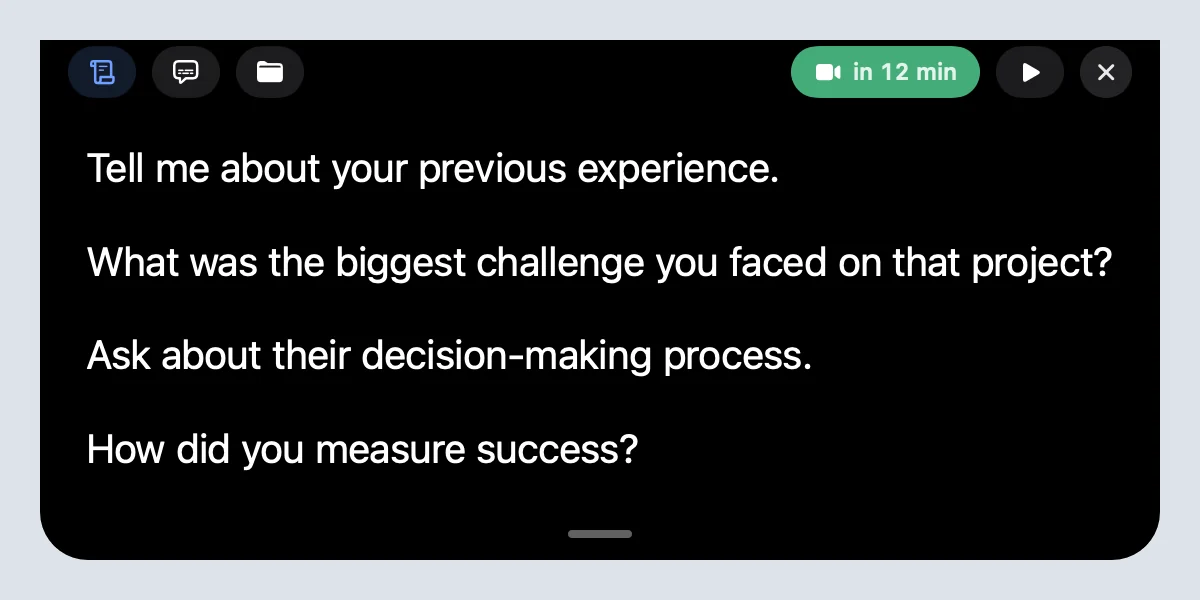
Here is what a whole interview can fit on. Each line is a trigger, not a sentence. Replace the examples with your own.
- Why this role: your design system + my B2B onboarding work
- Story 1, leadership: checkout redesign → 8 tests, −2 steps → drop-off −18%
- Story 2, conflict: eng pushback on scope → shared metric → shipped on time
- Story 3, failure: onboarding email flop → what I changed → now A/B test first
- Numbers: team of 5 · 3 launches in 2025 · NPS 32 → 41
- Ask them: what does success look like at 90 days?
- Ask them: how do design and engineering plan together?
- Ask them: what's the next step in the process?
Is using a teleprompter in an interview cheating?
Looking at your own prepared points is not cheating, in the same way that bringing notes to an in-person interview isn't. They are your stories, your numbers and your questions; you still have to answer what is asked, in your own words. It becomes a problem in two cases. First, when the rules say no notes: some one-way recorded interviews, live coding tests and proctored assessments forbid them, and you should follow that. Second, when something else answers for you: tools that listen to the interviewer and feed you AI-written answers in real time present someone else's thinking as yours.
Cued is the first kind. The notch shows only the notes you wrote before the call; it doesn't write answers for you during the call.
Setting it up with Cued
- Add the interview. It appears from your calendar, or create it in Cued.
- Write your cues. In the meeting's Teleprompter tab, one cue per line; a blank line starts a new prompt.
- Join the call. The cues sit in the notch under the camera, hidden from screen sharing. Point at them to hold the text still, or use the arrow keys to move between prompts.
- Afterwards. If you recorded the call with the interviewer's consent, the transcript and summary help you write a thank-you note.
Cued needs a Mac with Apple silicon and macOS 15 or later, and is designed for MacBooks with a notch. It is a one-time purchase, with no subscription.
Tech checklist for a video interview
- Camera at eye level. Prop the laptop on books if you need to, so you aren't looking down at the lens.
- Test sound and video in your own Zoom or Teams meeting first, with the same headphones you'll use.
- Notes right under the camera: in the notch, or on a sticky note at the top edge of the screen, never on a second monitor to the side.
- Hide self-view once you've checked your framing; watching yourself pulls your eyes away from the lens.
- A quiet, private room on a connection you trust, not a café's Wi-Fi.
- Close chat apps and turn on Do Not Disturb so nothing pops up while you share your screen.
- Do one practice call with a friend and watch the recording: if your eyes sweep across the screen, shorten the cues.
Make it look natural
- Glance, then look at the lens while you talk. Don't read sentences.
- Keep cues short; long lines make your eyes sweep.
- Pause before you look down. A short pause reads as thinking; looking down mid-sentence reads as reading.
Some assessments forbid notes; follow the rules you are given.
Questions
Can the interviewer see my notes?
Not through the call or screen sharing if you use Cued: the notch is hidden from screen capture. They can notice if your eyes move a lot, which is why short cues work better than a script.
Is it okay to read notes in a virtual interview?
Glancing at short notes is widely accepted; reading full answers is not. If you are told no notes, don't use them.
Where should I put notes for a Zoom interview?
As close to the camera as you can: in the MacBook notch, or on sticky notes around the top edge of the screen. Not on a second monitor or on the desk.
Will the interviewer know I'm reading?
If you read sentences, usually yes: your eyes move left to right and your voice flattens. With one-line cues you glance, look back at the lens and talk.
Is using a teleprompter in an interview cheating?
Not if it shows your own prepared points and notes are allowed. Being fed live AI answers is different, and Cued doesn't do that.
How much does Cued cost?
Cued is a one-time purchase: $9 for the first 50 founding members, then $29 with a year of updates. Download it from getcued.pro and pay inside the app after a quick setup.
Try Cued on your next call. Your script in the notch, your call recorded and summarised on your Mac.
Download for MacSources
- How to Succeed on Zoom Interviews, Penn Career Services
- The importance of good eye contact during an interview, Washington State University (from The Muse)
- Interview type: recorded, Northeastern University Career Design
- Quick guide to video interviews, University of Brighton Careers
- Conducting the interview, Yale Law School Career Development Office
- STAR method of interviewing, University of Washington Career & Internship Center