 Cued
Cued
The best notch teleprompter apps for Mac, compared
By Harshit Maurya, maker of Cued · Updated 16 October 2026
Seven apps put a teleprompter in the MacBook notch: Notchie ($29.99), Moody ($39), CueNotch (free with a paid Pro upgrade), NotchPrompter ($4.99), Textream and NotchPrompt (both free and open source), and Cued. GlassCue, VoicePrompter and GhostPrompter also hide from screen sharing but float in a window instead. Pick one that follows your voice if you read word-for-word scripts, a free one if you record now and then, and Cued if you want the teleprompter inside a meeting app that also records, transcribes and summarises your calls on your Mac, for a one-time price.
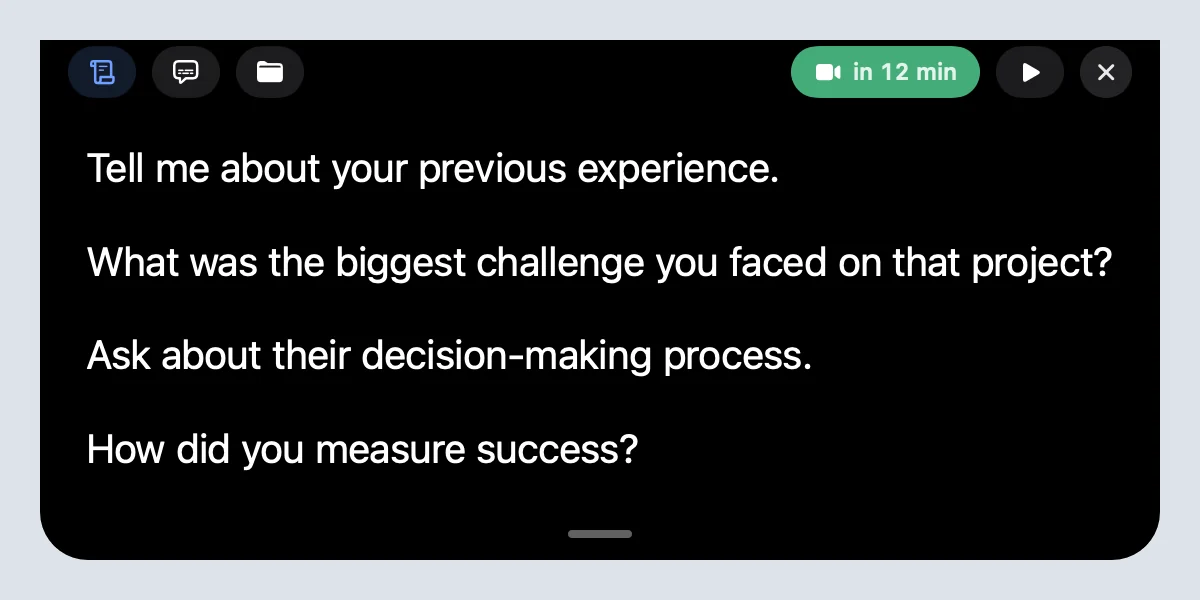
Notch teleprompters side by side
| App | Price | macOS | Follows your voice | Script import | Without a notch | Hidden from screen share |
|---|---|---|---|---|---|---|
| Cued | $9 founding, then $29; one-time, no subscription | 26+, Apple silicon | No: auto-scroll at three speeds, pauses when you point | Type or paste per meeting | Designed for notched MacBooks | Yes |
| Notchie | $29.99 one-time | 14.6+ | Yes, or manual | Not stated (in-app editor) | Listing says MacBooks with and without a notch | Yes, "in supported apps" |
| Moody | $39 one-time | 14.7+ | No: adjustable speed with shortcuts | Not stated | Not stated | Yes |
| CueNotch | Free (3 starts a day, 100-word scripts); Pro $29.99 lifetime or $7.99 a week | 14+ | Yes | TXT, Markdown, Word, PDF, PowerPoint | Floating prompter | Yes, with Ghost Mode (Pro) |
| NotchPrompter | $4.99 (Mac App Store) | 14.6+ | Voice activation | Not stated | Custom position, multi-monitor | Yes |
| Textream | Free, open source (MIT) | 15+ | Yes: word tracking or voice-activated | PowerPoint presenter notes (.pptx) | Floating window and fullscreen modes | Stated for its external-display mode |
| NotchPrompt | Free, open source (MIT) on GitHub; its site also sells a $49 Pro | 14+ | Yes: word tracking or voice-activated | PowerPoint presenter notes (.pptx) | Floating window and fullscreen modes | Yes |
Also hidden from screen share, but not in the notch
These float a window over your other apps instead of sitting under the camera. They work on any Mac, notch or not, but you have to place the window near the camera yourself.
| App | Price | macOS | Follows your voice | Script import | Hidden from screen share |
|---|---|---|---|---|---|
| GlassCue | $9.99 one-time, no account | 15+ | Not stated (adjustable speed) | .txt, .md or paste | Yes |
| VoicePrompter | Setapp from $9.99 a month; also sold on its own | 15+ | Yes, with Apple's on-device speech recognition | Not stated | Yes: Zoom, Meet, Teams, OBS, QuickTime, ScreenFlow |
| GhostPrompter | $49 one-time; Mac and Windows | Not stated | Yes | Not stated | Yes |
Which one should you pick?
- You read full scripts for videos and want the text to follow your voice: Notchie, CueNotch, Textream or NotchPrompt.
- You present from slides and want your PowerPoint notes in the notch: CueNotch, Textream or NotchPrompt import .pptx speaker notes.
- You want something free: Textream or NotchPrompt (open source), or CueNotch's limited free tier.
- Your Mac has no notch, or you use an external display: a floating app such as GlassCue or VoicePrompter, or the floating modes in CueNotch, Textream and NotchPrompt.
- You use the notes on live calls and also want the call recorded, transcribed and summarised without a bot: Cued.
- You are on an older macOS: CueNotch and NotchPrompt list macOS 14, Notchie and NotchPrompter 14.6; Cued needs macOS 15.
- You'd rather pay once than subscribe: most apps here are free or one-time; VoicePrompter on Setapp and CueNotch's weekly plan are subscriptions.
What to check before you choose
- Screen sharing. Every app here says it hides from sharing, but the wording differs ("in supported apps", "in Pro", "external display mode"). Before an important call, share your screen to a second device or record a test and check.
- Voice-follow versus speed. Voice-follow suits word-for-word scripts. For short talking points on a live call, a fixed speed or pausing by pointing is often calmer, because the text doesn't jump when someone else talks.
- How you get text in. Pasting is fine for one-offs; if you present from slides, .pptx import saves time.
- Price over time. A one-time app costs the same next year; a weekly or monthly plan keeps adding up.
What Cued does differently
Cued's teleprompter is part of a meeting app. Your talking points live with each meeting, along with its files and links. During the call the notch shows them under the camera, hidden from screen sharing and recordings; the call is recorded and transcribed on your Mac; afterwards you get a summary, action items and a follow-up email. It does not follow your voice: it scrolls at one of three speeds and stops the moment you point at it. It is a one-time purchase with no subscription.
Cued needs a Mac with Apple silicon and macOS 15 or later, and is designed for MacBooks with a notch.
Questions
Does Apple have a teleprompter?
macOS has no teleprompter app built in. The closest is Keynote's presenter display, which shows your presenter notes on your own screen and not the audience's, with Play → Rehearse Slideshow to practise. For notes under the camera on a call, you need a third-party app such as the ones above.
Can I use my Mac as a teleprompter?
Yes. Install a teleprompter app: notch apps put the text right under the MacBook camera, and floating apps put it in a window you place near the camera. Most of the apps here also hide the text from screen sharing.
Do notch teleprompters work on Macs without a notch?
Some do. CueNotch falls back to a floating prompter, Textream and NotchPrompt have floating and fullscreen modes, and Notchie's listing says it works on MacBooks with and without a notch. Floating apps such as GlassCue work on any Mac.
Can people on the call see the teleprompter?
All the apps here say they are hidden from screen sharing, some with conditions: CueNotch in Pro, Notchie in supported apps, Textream for its external-display mode. Test once before an important call.
Is there a free notch teleprompter?
Yes: Textream and NotchPrompt are free and open source, and CueNotch has a limited free tier. NotchPrompter costs $4.99 on the Mac App Store; its source is on GitHub under a non-commercial licence, not an open-source one.
How much does Cued cost?
Cued is a one-time purchase: $9 for the first 50 founding members, then $29 with a year of updates. Download it from getcued.pro and pay inside the app after a quick setup.
Try Cued on your next call. Your script in the notch, your call recorded and summarised on your Mac.
Download for MacSources
- Notchie on the Mac App Store
- CueNotch on the Mac App Store
- Moody on Payhip
- NotchPrompter on the Mac App Store
- NotchPrompter on GitHub (licence file)
- Textream on GitHub
- NotchPrompt on GitHub
- NotchPrompt website
- GlassCue on the Mac App Store
- VoicePrompter on Setapp
- GhostPrompter website
- Rehearse a presentation in Keynote on Mac, Apple Support