 Cued
Cued
The best teleprompter apps for video calls, compared
By Harshit Maurya, maker of Cued · Updated 14 October 2026
For live video calls, the key question is whether your script stays hidden when you share your screen. Notchie, Moody, CueNotch Pro and Cued sit in the MacBook notch and are hidden from screen sharing; Speakflow runs in a web browser, and its paid desktop app can stay invisible too. PromptSmart, BIGVU and Teleprompter Pro are built mainly for recording videos. Pick Notchie, CueNotch or Speakflow if you want the text to follow your voice, and Cued if you want your notes inside a meeting app that also records and summarises the call, knowing it scrolls at a set speed and needs macOS 15.
Side by side
| App | Price | Platforms | How it scrolls | Hidden from screen share | Works over a live call | Extras |
|---|---|---|---|---|---|---|
| Cued | $9 founding, then $29, one-time | macOS 15+, Apple silicon, notched MacBooks | Auto-scroll at Slow, Normal or Fast; pauses when you point; shortcuts step between prompts. Does not follow your voice | Yes, also hidden from recordings | Yes, in the notch under the camera | Records, transcribes and summarises the call; files and links on script lines |
| PromptSmart Pro | $29.99, plus an optional Extended subscription | iPhone, iPad; runs on Apple silicon Macs as an iPad app | Follows your voice (VoiceTrack, English only) | Not listed | Mainly built for recording | Remote control, file sync |
| BIGVU | Free (watermark, 9-minute takes); Starter $12/month or $149/year | iPhone, Android, web | Adjustable speed | Not mentioned | Not mentioned; built for recorded videos | AI scripts, video editing, social posting |
| Teleprompter Pro (formerly Teleprompter Premium) | Free download; paid upgrades listed up to $159.99 (sources differ on yearly vs lifetime) | Mac (macOS 12+), controls iPhone and iPad copies | Timed or continuous scroll; keyboard, remote or game controller. Voice scroll not listed | Not listed | See-through window that floats above other apps | Drives a physical prompter, remote control |
| Speakflow | Free (limited voice scroll); Plus $15/month billed yearly | Any browser; desktop app (beta) on paid plans | Follows your voice (Flow), auto or manual | Desktop app can stay invisible to viewers; the browser version shows if you share that screen | Yes, Overlay for Zoom, Meet and Teams (Plus) | Syncs scripts across devices (Plus) |
| Notchie | $29.99 one-time | macOS 14.6+ | Scrolls when you speak, pauses when you pause; pause on hover | Yes, in supported apps | Yes, in the notch | Runs locally, script queue, Family Sharing |
| Moody | About $39 one-time (other listings say $29) | macOS 14.7+ | Adjustable speed with shortcuts | Yes | Yes, in the notch | Teleprompter only |
| CueNotch | Free (3 starts a day, 100-word scripts); Pro $29.99 lifetime or $7.99 a week | macOS 14+ | Follows your voice, or a set speed | Yes, in Pro (Ghost Mode) | Yes, in the notch | Live captions, rehearsal coach, AI script polish, PowerPoint and PDF import |
Which one should you pick?
- If you want the text to follow your voice on a Mac call: Notchie or CueNotch Pro.
- If you also use Windows or switch between computers: Speakflow, which runs in a web browser.
- If you mostly record videos on your phone: PromptSmart Pro or BIGVU.
- If you run a physical teleprompter rig: Teleprompter Pro.
- If you want the cheapest way to try a notch teleprompter: CueNotch's free tier.
- If you read talking points on live calls and also want the call recorded, transcribed and summarised on your Mac with no bot: Cued.
- If your Mac runs macOS 14 or earlier, or has an Intel chip: not Cued, which needs macOS 15 and Apple silicon.
Where Cued fits
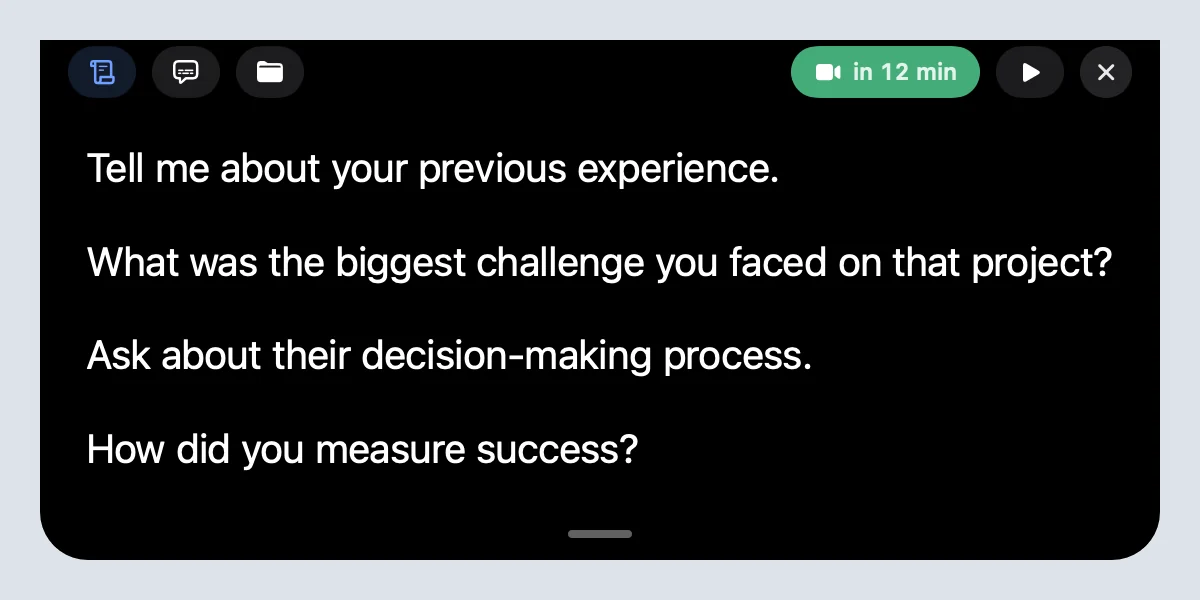
Cued is a meeting app with a teleprompter built in, not a standalone prompter. Each calendar meeting gets a workspace for talking points, files and links, and during the call those points sit in the MacBook notch, right under the camera. They auto-scroll at Slow, Normal or Fast, pause when you point at them, and ⌃⌥↓ and ⌃⌥↑ step between prompts. The notch is hidden from screen sharing and recordings, and you can attach a file or link to a line of your script. Cued also records the screen and both sides of the audio with no bot, then writes a summary and a follow-up email on your Mac. What it does not do: it does not follow your voice, it does not run on Windows, iPhone or older macOS, and there is no free plan. If voice-following scroll matters most, Notchie, CueNotch or Speakflow will suit you better.
Questions
Can people on a Zoom call see my teleprompter?
Not if the app is hidden from screen sharing. Cued, Notchie, Moody and CueNotch Pro say they are. Speakflow's browser version is visible if you share that screen; its desktop app can stay invisible. Test with a friend before an important call.
Which teleprompter follows my voice on a video call?
Notchie, CueNotch and Speakflow scroll as you speak, and PromptSmart does on iPhone and iPad. Cued does not: it scrolls at a speed you pick and pauses when you point at it.
Is there a free teleprompter for video calls?
Speakflow and CueNotch have free tiers with limits, and BIGVU has a free plan for recorded videos. Cued has no free plan.
How much does Cued cost?
Cued is a one-time purchase: $9 for the first 50 founding members, then $29 with a year of updates. Download it from getcued.pro and pay inside the app after a quick setup.
Try Cued on your next call. Your script in the notch, your call recorded and summarised on your Mac.
Download for Mac