 Cued
Cued
How to keep track of client calls, files and what you promised
By Harshit Maurya, maker of Cued · Updated 16 October 2026
To keep track of client calls, give every meeting one home that holds the client's files and links, your talking points, the recording, the transcript, and a summary of what was decided and who owns each task. Then make it searchable, so you can find what a client said months later. Cued, an AI note taker for Mac, builds that home automatically from your calendar, records and summarises the call on your Mac, and lets you search every call in plain words.
Why client calls are hard to keep track of
Client work is spread across too many places. The brief is in an email, the contract is in Drive, the latest feedback is in a chat, and the decision was made out loud on a call nobody wrote down. Freelancers and consultants describe the same pattern: by the next call they are rebuilding the last one from half a page of notes, and a week later they cannot prove what the client actually asked for.
What freelancers say on Reddit
- Notes end up everywhere: Notion, random email threads, voice memos on the phone, WhatsApp. People lose track of who they talked to and when (r/Freelancers, r/freelanceWriters).
- The embarrassing moment: a client asks about something from last week's call that nobody wrote down (r/Freelancers).
- Setting up a system is easy; keeping it updated is the part that fails. A UX freelancer with 60 contacts in Notion and Airtable kept falling behind (r/CRMSoftware).
- Typing notes during the call costs focus, and listening without notes costs the details. Recordings almost never get rewatched (r/CRM).
- The advice that comes back again and again: one page per client, easy to pull up before a call (r/freelancing).
So the best system is one that fills itself in. If every call already comes with its files, a transcript, decisions and owners, there is nothing to keep updated.
A simple system: what to capture, and when
Track each call in four moments. The table is the whole system; it takes about 15 minutes per call, most of it after the call.
| When | What to capture | Where it lives | Time |
|---|---|---|---|
| Before the call | The goal, three talking points, the files and links you may need | With the meeting, not in a separate folder | 5–10 minutes |
| During the call | The recording (with consent), the numbers and dates the client says | A recording and transcript, or short notes | 0 minutes if recorded |
| Within the hour | Decisions, who owns each task, deadlines, what you promised | A short recap sent to the client | 5 minutes |
| Months later | Nothing new: you search instead | Search across every call | Seconds |
- Before: gather the client's material in one place. Put the brief, the latest files, the links and three or four talking points with the meeting, not in a separate folder you have to remember.
- During: keep it in reach and capture the call. Keep the files one click away while you talk, and record the call with consent so you are not typing instead of listening.
- After: write down decisions and owners. Within the hour, note what was agreed, who owns each task and by when. Send that to the client so they can correct it.
- Later: search instead of re-reading. When a question comes up, search the calls for the words that were said instead of scrolling through old notes.
Spreadsheet, CRM or call notes: which do you need?
A spreadsheet or CRM tracks clients: who they are, what stage they are at, what they paid. It does not hold what was said on a call. Most freelancers need both a light client list and a record of each conversation.
| Option | Good for | Where it breaks | Cost |
|---|---|---|---|
| Spreadsheet | A list of clients, rates, stages and next follow-up dates | Nobody types call details into it after a long day | Free |
| CRM | Pipelines, reminders, many clients or a sales team | Setup and upkeep; call content still has to be typed in | Often a monthly fee per user |
| Notes app (Notion, Apple Notes) | One page per client with links and history | Only as good as what you remember to write | Free to monthly fees |
| Call recordings with transcripts and summaries | What was actually said, decisions and owners, searchable later | Needs consent; you still need a client list | Free to monthly fees, or one-time |
After the call: when to follow up
Send the recap the same day, while both of you remember the call. Keep it short: what was decided, who does what by when, and the next meeting. The client can correct anything you got wrong, and you have a written record if the scope changes later. See the meeting follow-up email guide for a template.
How Cued does it for you
- Every calendar meeting gets its own workspace. Links in the invite are pulled into its Files automatically.
- Drop in the client's files: documents, images, videos and links. Pin the ones you use in every call, like your rate card or portfolio, and they appear in every meeting.
- During the call the same files sit in the MacBook notch, one click away, and the notch is hidden from screen sharing.
- Cued records the screen and both sides of the audio, with no bot joining, and transcribes it live on your Mac.
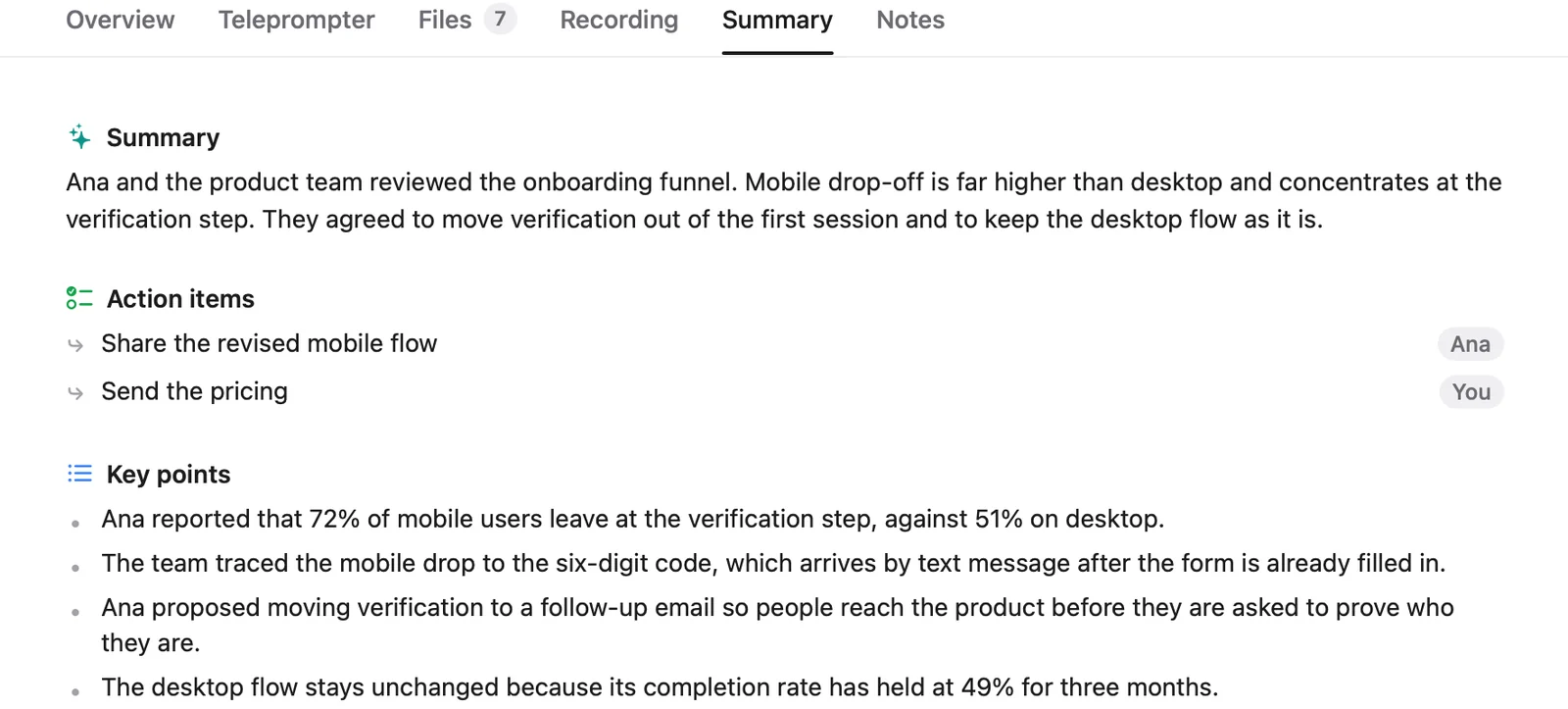
- When the call ends, it writes a summary with action items, owners and decisions, and drafts the follow-up email for you to review and send.
- Press ⌘K to search every call: transcripts, summaries, files and what was on screen. Results open the recording at the exact moment.
Cued does not read your email or chat apps, and it is not a CRM. It works from your calendar, the files you give it and the calls themselves, and all of it stays on your Mac.
Whatever tool you use, tell people you are recording and ask for their consent. Many places require everyone's permission by law. Cued needs a Mac with Apple silicon and macOS 15 or later, and is designed for MacBooks with a notch.
Questions
How do you keep track of client calls?
Give each call one home with the client's files, your talking points, the recording and a short list of decisions and owners, send a written recap the same day, and make all of it searchable. Cued builds that home automatically for every calendar meeting.
Can I use a spreadsheet to keep track of clients?
Yes, for the client list: names, rates, stages and follow-up dates. A spreadsheet is a poor place for what was said on calls, so pair it with recordings or call notes you can search.
How many clients before I need a CRM?
There is no fixed number. You need one when follow-ups start slipping or you lose track of who is at which stage. Many freelancers get far with a spreadsheet plus searchable call notes.
Do I need permission to record a client call?
Often, yes. Some US states and many countries require everyone's consent, so ask at the start of the call and record their yes. This isn't legal advice; see our guide to AI notetakers and client confidentiality.
Can Cued read my client emails or Slack messages?
No. Cued works from your calendar, the files and links you add, and the calls it records. Links in a calendar invite are added to the meeting automatically.
Do my clients' files leave my Mac?
No. Files you add are copied into Cued's folder on your Mac and are never uploaded. There is no Cued server.
How much does Cued cost?
Cued is a one-time purchase with no subscription: $9 for the first 50 founding members, then $29 with a year of updates. Download it from getcued.pro and pay inside the app after a quick setup.
Try Cued on your next call. Your script in the notch, your call recorded and summarised on your Mac.
Download for MacSources
- How do you keep track of client calls? r/freelance, May 2024
- Anyone else struggle to keep track of client convos and follow ups? r/Freelancers, Oct 2025
- How do you manage clients and projects as a freelancer? r/freelanceWriters, Jan 2026
- Freelancers: how do you keep track of tasks across multiple clients? r/freelancing, Mar 2026
- Do you take notes during calls or just trust your memory? r/CRM, Jan 2026
- Client communication best practices, Scribbl
- Organising client engagements when documents live in five places, SafeAppeals