 Cued
Cued
How to find what someone said in a past meeting
By Harshit Maurya, maker of Cued · Updated 21 October 2026
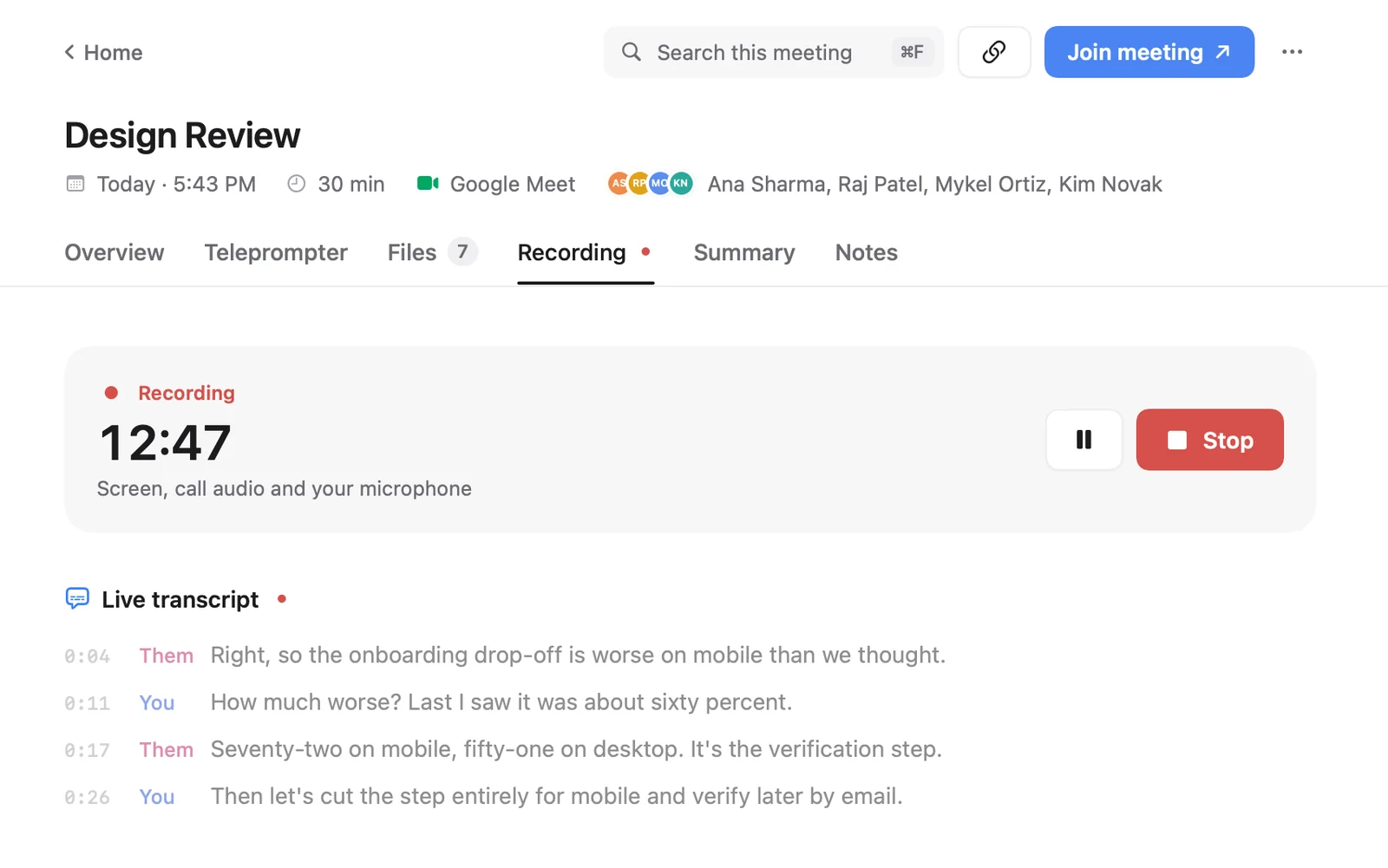
To find what someone said in a past meeting, you need the meeting recorded and transcribed, then a search that covers every call at once. Search for the words you remember, or describe it in plain words, and open the recording at that moment to hear it again. Zoom, Google Meet and Teams each keep transcripts in their own place, with plan limits. Cued does it on your Mac for every call app: press ⌘K, type what you remember, like 'launch date', and it shows the matching lines from every transcript, summary and file, and plays the recording from that second.
Why does this matter with clients?
Sales reps on Reddit put it bluntly: rewatching recordings sounds good in theory and never happens, and typing notes during the call means losing the thread. Search fixes both: you record without typing, and you never rewatch, you jump to the one sentence you need.
Disputes with clients are rarely about bad faith. Both sides remember the call differently. The fix consultants recommend is a written record of decisions, and when that record is thin, the call itself. Being able to replay the exact sentence, 'we said the second round of changes is included', settles it in seconds and without an argument.
Can you search transcripts in Zoom, Google Meet and Teams?
Yes, with limits. Each platform keeps its own transcripts, so you search one platform at a time, and only calls that were transcribed on a plan that includes it.
| App | Where transcripts live | What you need | How to search |
|---|---|---|---|
| Zoom | Cloud recordings in the Zoom web portal (VTT files) | A Pro, Business, Education or Enterprise account with cloud recording and audio transcription turned on | Recordings & Transcripts → Cloud recordings → 'Search text in audio transcript' |
| Google Meet | The organizer's Google Drive, in a Google Meet folder, and attached to the Calendar event | A Workspace edition with transcripts, such as Business Standard or Workspace Individual | Open the transcript and use find, or search Drive |
| Microsoft Teams | The meeting's Recap tab | Transcription turned on in the meeting | Open the meeting chat → Recap → Transcript |
| Cued | Cued's folder on your Mac | Cued, recording the call | ⌘K across every call, or ⌘F in one meeting |
Two things catch people out. First, Zoom's transcript search covers cloud recordings; a call you recorded locally to your Mac is not in it. Second, Teams keeps meeting transcripts for 120 days by default unless the organizer deletes them earlier, so an old call may simply be gone.
How do you search every call at once with Cued?
- Open search. Press ⌘K in Cued. To search one meeting only, open it and press ⌘F.
- Type what you remember. Exact words always work. Turn on smart search (a one-time 894 MB download that runs on your Mac) and plain descriptions work too: 'what they said about the logo', 'deadline for phase two'.
- Read why it matched. Results are grouped: Transcripts, On screen, Notes and summaries, Files, Images. Each shows the time or page.
- Play the moment. Press Return to open the recording at that second, with captions. ⌘Return opens the whole meeting.
Search runs on your Mac. Your questions and your calls are never sent anywhere. It is tested in English today.
What gets searched?
- Transcripts of every recorded call, both sides, whichever app the call was in: Google Meet, Zoom, Teams, FaceTime, Webex or Slack.
- Summaries, action items and decisions.
- What was on screen during the call, so a number on a shared slide can be found.
- The documents and images attached to each meeting.
How do you search well?
- Search for the thing, not the conversation: 'invoice', 'logo', 'March' rather than 'when we talked about money'.
- Try the other person's words. Clients say 'the deck' when you say 'the proposal'.
- Search names of people, products and competitors. They are rarely mis-transcribed and narrow results fast.
- Use a date or a project name to tell repeat calls apart.
- When a result looks close, play ten seconds either side. Transcripts are good, not perfect, and quiet or overlapping speech causes mistakes.
What should you do before you can rely on search?
Search only finds what was recorded. Tell people you are recording at the start of each call and ask for their consent; with Cued no bot joins, so nobody is notified automatically and telling them is your job. Then search becomes a habit: before a follow-up call, search the client's name and read the last summary; before you quote a price, search 'price' to see what you said last time.
Whatever tool you use, tell people you are recording and ask for their consent. Many places require everyone's permission by law. Cued needs a Mac with Apple silicon and macOS 15 or later, and is designed for MacBooks with a notch.
Questions
Can I search inside recorded meetings by words that were said?
Yes, if the call was transcribed. In Zoom, Meet and Teams you search one platform's transcripts at a time. In Cued, ⌘K searches every transcript on your Mac and opens the recording at the matching second.
Can I search a Zoom recording I saved to my computer?
Not with Zoom's transcript search, which covers cloud recordings. If Cued recorded the call, its transcript is searchable in Cued.
Do I need the exact words?
Not with Cued's smart search turned on: it matches by meaning, so a description of what was said usually finds it. Without it, Cued matches the words themselves.
How long are Teams transcripts kept?
Microsoft says Teams meeting transcripts are kept for 120 days by default unless the organizer deletes them earlier.
Is my search sent to the cloud?
Not in Cued. Search runs on your Mac with an on-device model.
How much does Cued cost?
Cued is a one-time purchase with no subscription: $9 for the first 50 founding members, then $29 with a year of updates. Download it from getcued.pro and pay inside the app after a quick setup.
Try Cued on your next call. Your script in the notch, your call recorded and summarised on your Mac.
Download for MacSources
- Using audio transcription for cloud recordings, Zoom Support
- Google Meet transcripts, Google Meet Help
- Start, stop and download live transcripts in Teams meetings, Microsoft Support
- Client meeting notes: decisions, not topics, Fyxer
- Do you take notes during calls or just trust your memory? r/CRM, Jan 2026