 Cued
Cued
How to capture action items and decisions from every meeting
By Harshit Maurya, maker of Cued · Updated 21 October 2026
To capture action items reliably, write each one as a task with one owner and a due date, keep decisions separate from discussion, and send the list to everyone within an hour of the call so they can correct it. An AI note taker can draft this from the transcript. Cued, a Mac app that handles your whole online meeting, writes the summary, the action items with owners and the decisions as soon as the call ends, without uploading the call, and drafts the follow-up email for you to review and send.
Why do action items get lost?
Managers on Reddit describe the same scene: the meeting ends and everyone walks out with a different version of what was decided. Others point out that a ten-page transcript does not help either, because nobody reads it. What works is short: decisions, owners and dates, written right after the call and sent to everyone so they can correct it.
Most lost tasks fail in one of three ways. Nobody owns them ('we should update the deck'). They have no date ('soon'). Or they were said out loud and never written down, so they live in one person's memory until the next call. Each one is fixed by writing the task the same way every time.
What does a good action item look like?
Start with a verb, name one person, give a date. If two people own it, nobody does; pick one and let them pull in the other.
| Weak | Strong |
|---|---|
| Follow up on pricing | Priya sends the revised price sheet to Northbay by Thursday |
| Look into the bug | Sam reproduces the login bug and posts steps in #support by Friday noon |
| Timeline discussed | Decision: launch moves to 3 November |
| Next steps TBD | Open question: who signs off the copy? Ask Dana before Monday |
What should the full record include?
- Decisions: what was agreed, in one line each. 'Timeline discussed' is not a decision; 'Launch moves to 3 November' is.
- Action items: the task, one owner, a due date.
- Open questions: what still needs an answer, and from whom.
- The date, the attendees and the meeting name, so it can be found later.
Leave out the play-by-play. If someone needs the detail, the recording and transcript are there; the record is for what happens next.
A template you can copy
- Meeting: [name], [date]. Attendees: [names].
- Decisions: [decision 1]. [decision 2].
- Action items: [verb + task], [owner], by [date]. [verb + task], [owner], by [date].
- Open questions: [question], [who answers], by [date].
- Next meeting: [date] or 'none planned'.
When and how should you capture them?
- Say them out loud before the call ends. Spend the last two minutes on 'so who does what by when'. It catches the tasks nobody claimed.
- Write them within the hour. After that, details blur and other calls get in the way.
- Send them to everyone. Ask people to reply if anything is wrong. Silence becomes agreement.
- Put them where work happens. Copy tasks into your task app or project board, not only into the email.
- Open the last list at the next meeting. Start with what was done and what slipped.
How does Cued write them for you?
- Record the call. Cued starts when a Google Meet, Zoom or Teams call starts, or press ⌥R for any call. It records through your Mac, so no bot joins.
- Hang up. The transcript is saved and the summary is written on your Mac, with on-device models.
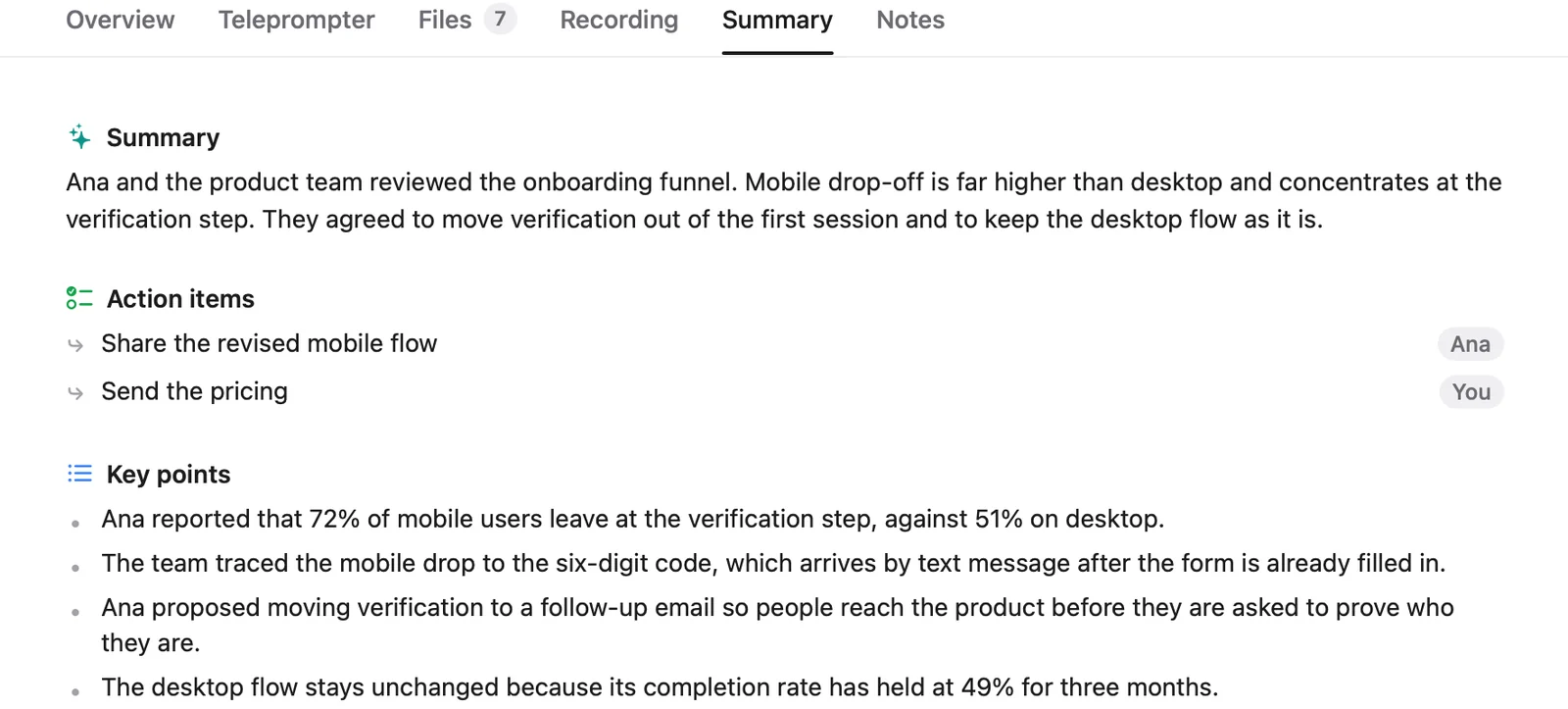
- Review. Open the Summary tab: summary, action items with owners, decisions and the follow-up. Fix anything the transcript got wrong.
- Send. Open the drafted follow-up in Gmail or Mail, edit and send. Nothing is sent automatically.
Because the summary comes from what was actually said, the owners and dates people named on the call are already in it. Transcripts are good, not perfect, so read the list before you send it. Later, ⌘K finds any action item across every call.
Whatever tool you use, tell people you are recording and ask for their consent. Many places require everyone's permission by law. Cued needs a Mac with Apple silicon and macOS 15 or later, and is designed for MacBooks with a notch.
Questions
Can AI write meeting minutes for me?
Yes. Cued writes a summary, action items and decisions from the transcript as soon as the call ends, on your Mac. Read it before you send it; AI drafts are good, not perfect.
How do you write a good action item?
Start with a verb, name one owner and give a due date: 'Priya sends the revised price sheet by Thursday'.
How soon should I send action items after a meeting?
Within an hour if you can, and the same day at the latest, while people still remember the details.
Does it work for Zoom, Meet and Teams?
Yes, and FaceTime, Webex and Slack calls too, because Cued records through your Mac rather than joining as a bot.
How much does Cued cost?
Cued is a one-time purchase with no subscription: $9 for the first 50 founding members, then $29 with a year of updates. Download it from getcued.pro and pay inside the app after a quick setup.
Try Cued on your next call. Your script in the notch, your call recorded and summarised on your Mac.
Download for Mac