 Cued
Cued
AI note taker without a bot: how it works and which apps do it
By Harshit Maurya, maker of Cued · Updated 16 October 2026
An AI note taker without a bot records the call from your own computer, using its sound output and microphone, instead of sending a 'Notetaker' guest into the meeting. Granola AI, Jamie, MacWhisper, Anarlog and Cued work this way, and Otter, Fireflies and Fathom now have bot-free desktop modes. Cued goes one step further on a Mac: the recording, transcript and summary are all made on the device, nothing is uploaded, and you pay once instead of a subscription.
What is an AI note taker without a bot?
An AI note taker (or AI notetaker) listens to a call, writes a transcript and turns it into a summary with action items. It can get the audio in one of two ways. It can send a bot: an extra participant that joins the meeting through its link, like a person would. Or it can record on your own computer, from the same sound you hear and the microphone you speak into. The second kind is called bot-free, botless or no-bot.
People look for it for plain reasons. A bot showing up as a participant feels awkward on a client call. Some companies and hosts remove or block bots. And a bot can only join calls with a meeting link it can reach, while your own computer hears every call you are on.
Bot vs bot-free: the differences
| Meeting bot | Bot-free (records on your computer) | |
|---|---|---|
| How it gets the audio | Joins the meeting as an extra participant | Records your computer's sound output and microphone |
| Seen by others in the call | Yes, in the participant list, often named 'Notetaker' | No, nothing new appears in the call |
| Can the host remove it? | Yes, like any guest | There is nothing in the call to remove |
| Calls without a meeting link (FaceTime, Slack huddles) | Usually not | Yes, if the app records any sound on the computer |
| Records a meeting you don't attend | Some can | No, your computer has to be in the call |
| Who tells the other people | The bot's presence does, partly | You do |
| Where the audio is processed | On the vendor's servers | Usually still on the vendor's servers; a few apps, Cued among them, do it on the device |
Notice the last row. Bot-free describes how the audio is captured, not where it goes. Most bot-free apps still upload the audio for transcription and summaries, so 'no bot' and 'private' are two separate questions.
How bot-free capture works
- System audio and microphone. Most bot-free apps record what your speakers play plus your microphone. Granola's help says it has no meeting bot and uses your system audio and microphone; because it hears the whole system output, other sounds on your computer can end up in the transcript too.
- A virtual microphone and speaker. Krisp installs its own audio devices, and you pick 'Krisp Microphone' and 'Krisp Speaker' in the call app's settings, so the call's sound passes through it.
- A browser extension. It runs inside the meeting tab, so it only covers calls you take in that browser.
- The call app's own recorder. Zoom, Google Meet and Teams can record and transcribe with no bot, but they tell everyone, and they need the host's permission or a paid or work plan.
On a Mac, any app that records the call's sound needs your permission first: System Settings → Privacy & Security → Screen & System Audio Recording. Apple's guide says you can allow an app to record your screen and audio, or just your audio.
Which AI note takers work without a bot?
| App | How it avoids a bot | Where transcription happens | Keeps the audio or video? | Price |
|---|---|---|---|---|
| Cued (Mac) | Always; records the screen and both sides through the Mac | On your Mac | Yes, on your Mac | One-time: $9 for the first 50 founding members, then $29; no subscription |
| Granola AI | Always; system audio and microphone | Cloud transcription providers (it names Deepgram and Assembly as examples) | No; audio is deleted after transcription | Free with 30-day history; Business $14 a month |
| Otter | Desktop app for Mac and Windows records bot-free; its Notetaker can also join Zoom, Teams and Meet | Otter's cloud | Yes (the free plan exports mp3) | Free (300 min a month); Pro $16.99 a month, or $8.33 a month yearly |
| Fireflies | Desktop app for Mac and Windows uses system audio, no Notetaker | Results appear in its web dashboard | No, not in bot-free mode | Free plan and paid plans per seat |
| Fathom | Lets you choose bot or no bot; bot-free is live on Mac, Windows coming | Fathom's service | Bot-free audio and transcript, or transcript only | Free; Premium $20 a month, or $16 yearly |
| Jamie | Runs on your device, no bot | Processed and stored in the EEA, Switzerland and the UK | Not stated | Free (10 notes a month); paid from €21 |
| MacWhisper (Mac) | Records Zoom, Teams, Webex and more, 'no bots joining' | On your Mac with local models, or a cloud service with your own key | Not stated | Free version; Pro €64, pay once |
| Anarlog (Mac, formerly Hyprnote/Char) | No bot | On the device on the free plan | Recordings stay on your device by default | Free; Pro $14 a month |
Tools that lead with a bot: Otter's Notetaker can join meetings automatically from your calendar; Read.ai says everyone in the meeting knows it is there; Fireflies and Fathom offer a bot alongside their desktop modes. That suits teams that want the note taker to be visible, or to cover meetings nobody from the team attends.
How to choose a bot-free AI note taker
- Where does the audio go? On the device, to the vendor, or to the vendor's AI providers. Read the privacy page, not the home page.
- Where is the summary written? An app can transcribe on the device and still send the transcript to a cloud model for the summary.
- Is the recording kept? Some apps keep only the text; others keep audio or video you can replay.
- Does it train on your data? Check the privacy policy and whether there is an opt-out.
- What does it cost over two years? A $14 monthly plan is $336 over two years; a one-time purchase is paid once.
- Does it work offline? Only apps that run the models on your computer do.
Is it legal to use an AI note taker without a bot? Will they know?
Bot-free does not change the law. Recording rules depend on where you and the other people are, not on how the app captures the call. This isn't legal advice, but the general picture is clear.
- In the US, federal law and most states allow recording if one person in the conversation (you) agrees. The Reporters Committee for Freedom of the Press lists 11 states that need everyone's consent: California, Delaware, Florida, Illinois, Maryland, Massachusetts, Michigan, Montana, New Hampshire, Pennsylvania and Washington.
- When a call crosses state lines, the same guide says to assume the stricter state's law applies.
- In the UK, data protection law gives people a right to be informed: the ICO says you must tell people how their data is used when you collect it.
- Some professions have their own rules. The New York City Bar's Formal Opinion 2025-6 says lawyers must tell clients and get their consent before an AI system records a call, even though New York is a one-party state.
Will they know? Not automatically. Zoom, Meet and Teams show a notice when they record themselves, and a bot shows up in the participant list. An app recording on your computer does neither, and Cued sends no notice. So telling people is your job, and it is good manners anyway.
A line that works at the start of a call: 'Quick note: I record my calls on my laptop so I can write up notes afterwards. It stays with me. Is that okay?' The RCFP guide suggests getting the answer on the recording itself.
How Cued takes notes without a bot
- It starts recording when a Google Meet, Zoom, Microsoft Teams, FaceTime, Webex or Slack call starts, or when you press ⌥R.
- It saves the screen, the call's audio and your microphone as one recording on your Mac.
- A live transcript labels you and the other side, with each line linked to its moment in the video.
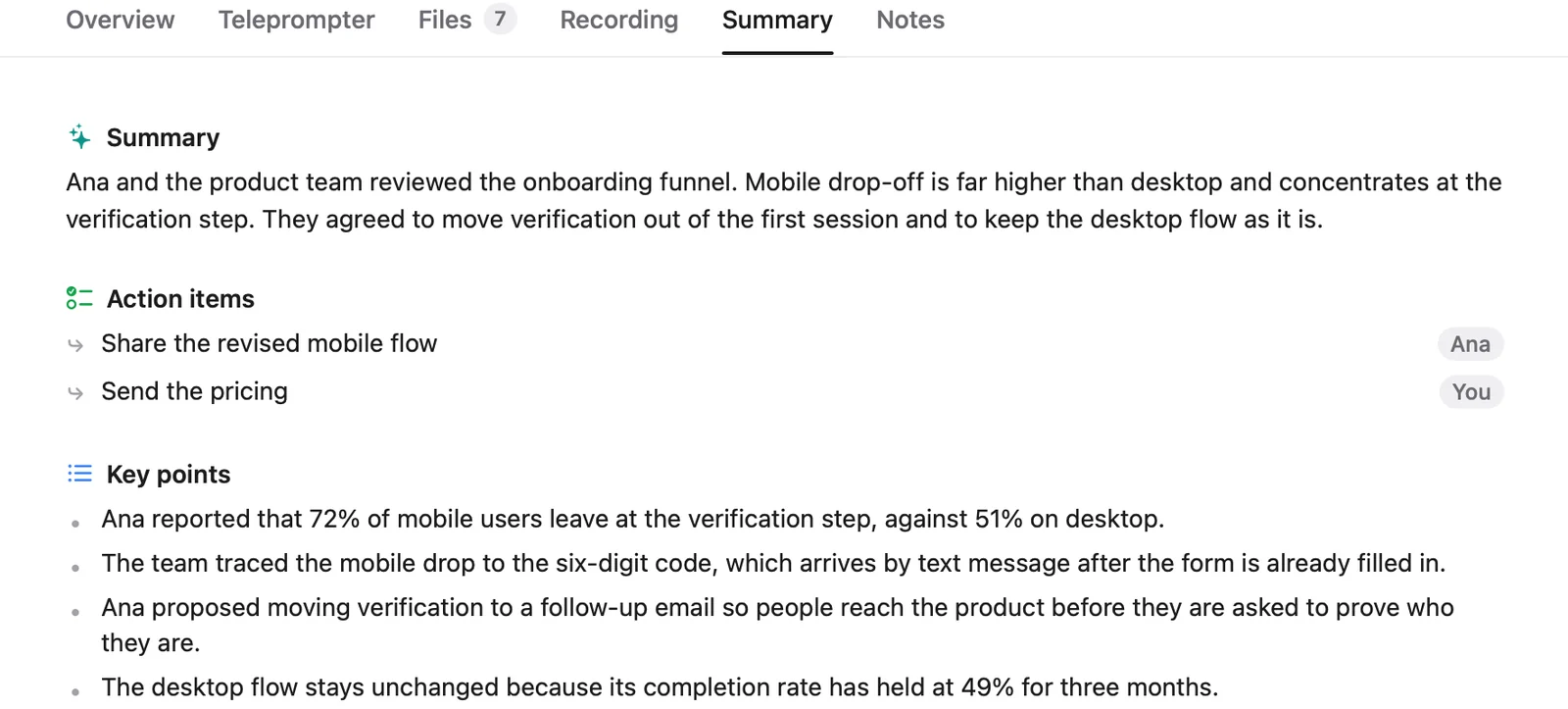
- After the call it writes a summary with the key points and action items, and drafts a follow-up email that you read and send yourself.
- Transcription uses Apple's on-device speech recognition, and summaries are written by an on-device language model. Nothing about the meeting is sent to a Cued server; there is none.
Where Cued is weaker: it is Mac only, it is tested in English, and transcripts are good but not perfect, so quiet, overlapping or noisy audio causes mistakes. If you need notes on Windows or a phone, or a shared team workspace, a cloud app will suit you better.
Questions
Is there an AI note taker that doesn't join the call?
Yes. Cued, Granola AI, Jamie, MacWhisper and Anarlog record from your computer, and Otter, Fireflies and Fathom have bot-free desktop modes. Check where each one sends the audio.
Will the other person know they're being recorded?
Not automatically. With a bot-free app nothing appears in the call, so tell people yourself, and in all-party consent places, ask before you start.
Is there an AI note taker without a subscription?
Yes. Cued is a one-time purchase: $9 for the first 50 founding members, then $29 with a year of updates. MacWhisper Pro is also pay-once, and Meetily's community edition is free and open source.
Does it work offline?
Cued's recording, transcripts and summaries work offline. Your calendar, new Meet links and meeting preparation need a connection. Cloud note takers need the internet to transcribe.
Does a bot-free note taker still give summaries and action items?
Usually, yes. Cued writes a summary with key points and action items after every call, on your Mac.
How accurate are the transcripts?
Good, not perfect. Quiet, overlapping or noisy audio causes mistakes, so check anything important before acting on it.
Try Cued on your next call. Your script in the notch, your call recorded and summarised on your Mac.
Download for MacSources
- Granola help: transcription (no meeting bot, system audio and microphone)
- Granola security (transcription and AI providers, audio not stored)
- Granola pricing
- Introducing the Otter desktop app for Mac and Windows, Otter, 7 Oct 2025
- Otter pricing
- Fireflies: record meetings without a bot on the desktop app
- Fathom: what's new (bot or no bot)
- Fathom pricing
- Jamie
- Jamie pricing
- Krisp AI note taker
- MacWhisper
- Anarlog
- Meetily on GitHub
- Read.ai
- Control access to screen and system audio recording on Mac, Apple Support
- Introduction to the Reporters Recording Guide, RCFP
- Right to be informed, UK ICO
- Formal Opinion 2025-6, New York City Bar
- Starting a computer recording (host permission, indicator), Zoom Support
- Record a video meeting, Google Meet Help
- Start, stop and find meeting recordings in Teams, Microsoft Support
Related guides
- The best private meeting notes apps for confidential calls
- Is it safe to use an AI notetaker on confidential client calls?
- Meeting recorder for Mac: how to record Zoom, Google Meet and Teams calls
- A Granola AI alternative with on-device transcription
- An Otter.ai alternative for Mac that stays on your device
- A Fireflies.ai alternative that keeps your calls on your Mac
- Offline meeting transcription on a Mac
- The best AI note takers for Mac in 2026, compared