 Cued
Cued
How to write a follow-up email after a meeting
By Harshit Maurya, maker of Cued · Updated 21 October 2026
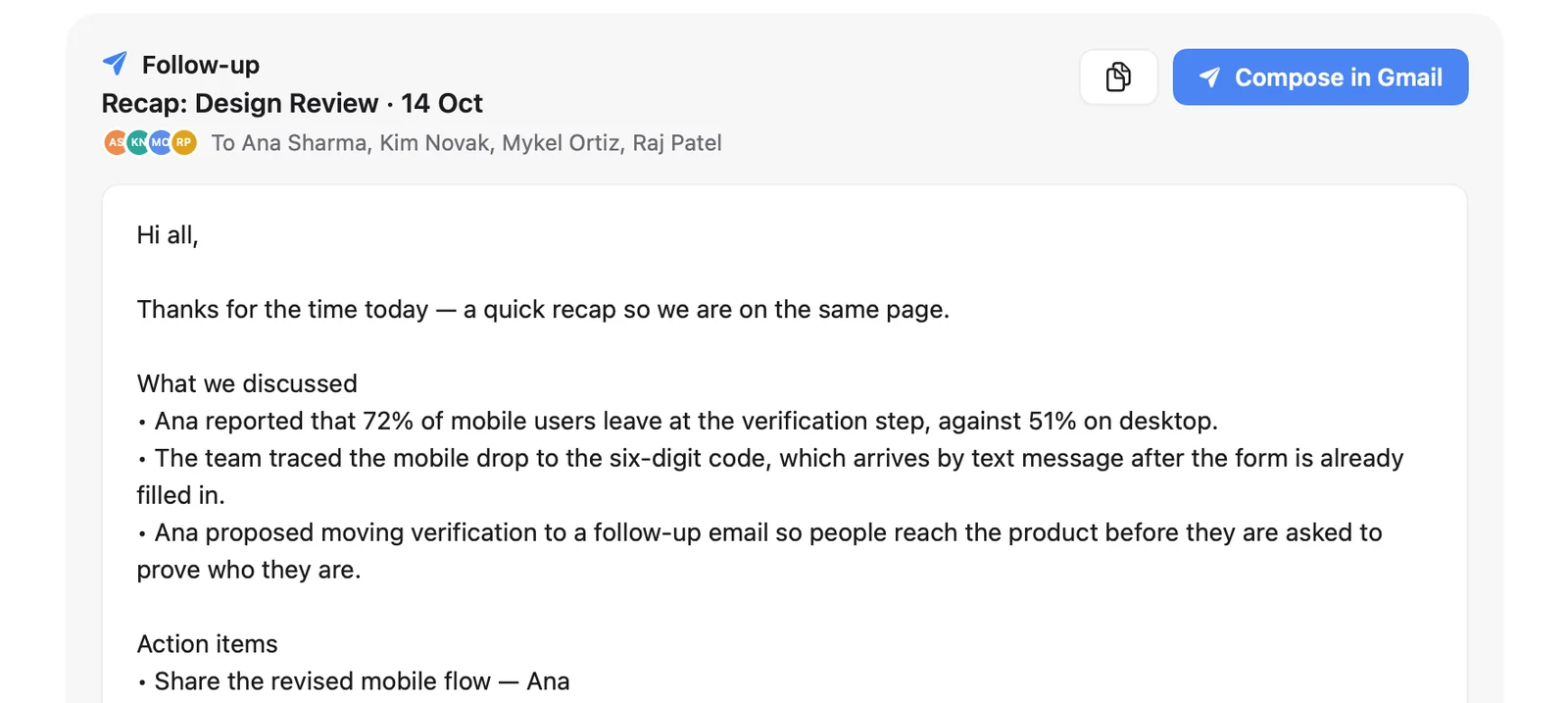
A good follow-up email after a meeting goes out within 24 hours and has four parts: a one-line thank-you, the decisions made, the action items with an owner and a date for each, and the next step. Keep it short and put the meeting name and date in the subject line. Cued, a Mac app that handles your whole online meeting, drafts this email from the call's transcript on your Mac; you review it and send it yourself.
Why send a follow-up at all?
Because people leave the same meeting with different memories of it. A short written follow-up turns the conversation into a shared record: what was agreed, who does what, by when. It catches misunderstandings while they are cheap to fix, it gives the people who missed the call the outcome in one minute, and with clients it quietly shows you were listening.
What should a follow-up email include?
- Subject line. The meeting or project and the date, for example: Follow-up: Northbay kickoff, 14 Oct.
- Thank-you. One line. No more.
- Decisions. What was agreed, as short bullets.
- Action items. Each task with one owner and a due date.
- Next step. The next meeting, or the one thing you need from them, and ask them to reply if anything is missing.
When should you send it?
Within 24 hours, and the same day if you can, while everyone remembers the details. If the call ends late in someone's day, write it straight away and use your email app's scheduled send (Gmail calls it Schedule send) so it lands at the start of their next morning. A late follow-up is still better than none.
A general template you can copy
- Subject: Follow-up: [meeting], [date]
- Hi [names], thanks for your time today. Here's what we agreed:
- Decisions: [decision 1]; [decision 2]
- Action items: [task], [owner], by [date]; [task], [owner], by [date]
- Next: [next meeting or what you need from them]. Reply if I've missed anything.
- [Your name]
Templates for client, sales and team meetings
| Meeting | Lead with | Must include | End with |
|---|---|---|---|
| Client project call | The decision that changes the work | Scope changes, deadlines, files you promised to send | What you need from them and by when |
| Sales or discovery call | Their goal in their words | The problem, what they use today, who else decides | The next step with a date, and a calendar link |
| Internal team meeting | Decisions | Owners and dates for every task, open questions | When the group meets next, or 'no meeting needed' |
| Job interview (as the candidate) | Thanks and one specific thing you discussed | One line on why you fit, anything you said you would send | Looking forward to next steps |
Example for a client call: 'Hi Sam, thanks for today. We agreed to keep the blue palette and move launch to 3 November. I'll send the revised homepage by Thursday; you'll confirm the copy by Monday. Next check-in: Friday at 4. Reply if I've missed anything.' Five sentences, and nobody can remember it differently.
Common mistakes
- Sending a transcript or a long summary instead of decisions and tasks. Nobody reads ten pages.
- Tasks without owners ('we'll look into it') or without dates ('soon').
- Burying the one thing you need from them in the middle of a paragraph.
- Leaving out people who own a task but weren't on the call.
- Waiting a week, by which time the details have changed in everyone's head.
How does Cued draft it for you?
- Record the call. Cued records Google Meet, Zoom, Teams, FaceTime, Webex and Slack calls through your Mac when they start, or press ⌥R. No bot joins.
- Hang up. Cued writes a summary with key points and action items, and drafts the follow-up email from the transcript, all on your Mac.
- Review and edit. Read the draft. Transcripts are good, not perfect, so check names, dates and numbers.
- Send it yourself. Open the draft in Gmail or Mail and send. Nothing is sent until you press send.
Because the draft comes from what was actually said, the owners and dates people named on the call are already in it. The recording and transcript stay on your Mac.
Whatever tool you use, tell people you are recording and ask for their consent. Many places require everyone's permission by law. Cued needs a Mac with Apple silicon and macOS 15 or later, and is designed for MacBooks with a notch.
Questions
When should I send a meeting follow-up?
Within 24 hours, while everyone remembers the details, and the same day if you can. A late follow-up is still better than none.
Who should I send it to?
Everyone who attended, plus anyone who owns a task or needs to know the decisions.
How long should a follow-up email be?
Short enough to read in a minute: a thank-you line, decisions, action items with owners and dates, and the next step.
What subject line should I use?
The meeting or project and the date, such as 'Follow-up: Northbay kickoff, 14 Oct', so it is easy to find later.
Does Cued send emails for me?
No. It drafts the email; you review and send it yourself.
How much does Cued cost?
Cued is a one-time purchase: $9 for the first 50 founding members, then $29 with a year of updates. Download it from getcued.pro and pay inside the app after a quick setup.
Try Cued on your next call. Your script in the notch, your call recorded and summarised on your Mac.
Download for Mac