 Cued
Cued
How to handle back-to-back meetings without losing context
By Harshit Maurya, maker of Cued · Updated 16 October 2026
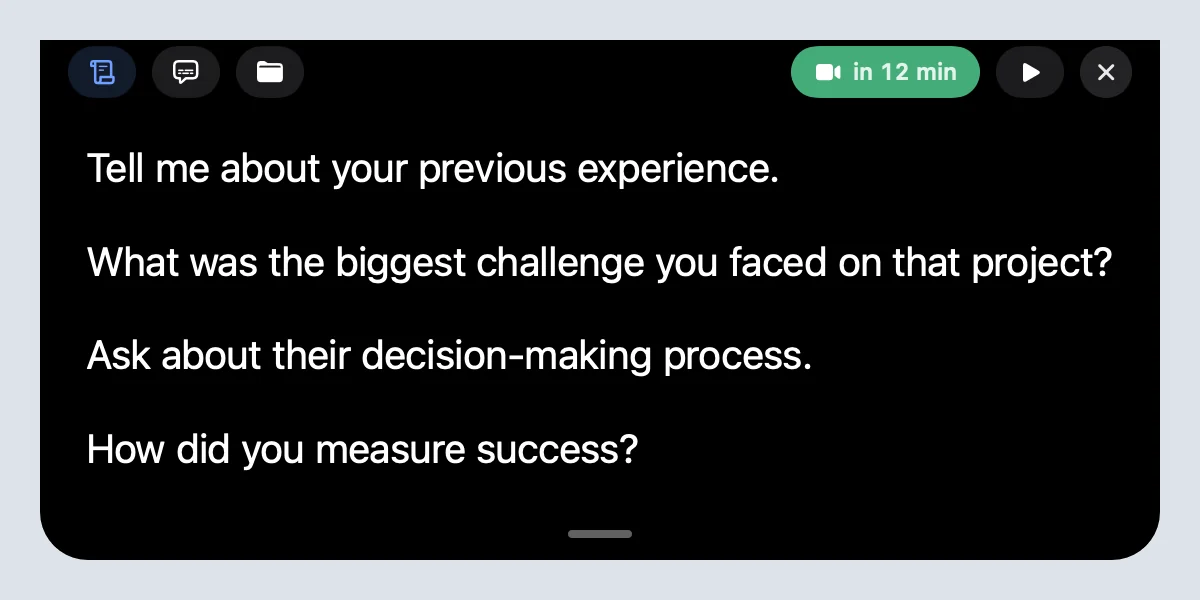
To handle back-to-back meetings, build short breaks into your calendar (Google Calendar's speedy meetings or Outlook's shorten-events setting end meetings 5–10 minutes early), let a tool capture each call so you are not writing while talking, and have the next meeting's notes and files appear by themselves. Then use the gap to rest and read one line, not to search. Cued does the last two on a Mac: it records and summarises each call, and 30 minutes before the next calendar call the notch shows its talking points, files and a Join button.
Why back-to-back meetings wear you out
Stress builds from one meeting to the next when there is no break, and a short break resets it. That is what Microsoft's Human Factors Lab found in a small 2021 study. Fourteen people wore EEG caps through two sessions of four 30-minute video meetings: one session back to back, one with 10-minute breaks spent meditating with the Headspace app.
- Back to back, brain activity linked to stress (beta waves) rose over the two hours: it built up rather than resetting.
- With breaks, that activity dropped during each break and stayed steady across all four meetings.
- Without breaks, stress spiked at the switch from one meeting to the next. Breaks reduced the spikes.
- People who had breaks showed brain patterns linked to engagement; those without showed patterns linked to withdrawal.
It was 14 people, so treat it as a strong hint rather than proof. It matches what people describe: a product manager on Reddit with four or more hours of calls a day said they lose much of each call the moment they click Leave Meeting, and many replies said the same. The previous call's details are lost, and the next one starts cold.
Calendar settings that add a buffer between meetings
The easiest fix is to stop booking meetings that end on the hour. Both big calendars can shorten new meetings for you, so a 30-minute call becomes 25 and a one-hour call ends early.
| Calendar | Where | What it does |
|---|---|---|
| Google Calendar | Settings > Event settings > Speedy meetings | Shortens your default meeting length by 5 or 10 minutes, depending on the length. Google also suggests a 25-minute default instead of 30. |
| New Outlook for Windows | Settings > Calendar > Events and invitations > Shorten duration for all events | Pick how many minutes to cut from meetings under an hour and from longer ones. |
| Classic Outlook | File > Options > Calendar > Calendar options > Shorten appointments and meetings | Choose End early or Start late, and the minutes for short and long meetings. |
| Any calendar | Your booking link or scheduling tool | Add a buffer before and after booked calls, and block a meeting-free hour each day. |
Microsoft's help page lists the Outlook setting for Outlook for Microsoft 365, Outlook 2024 and new Outlook for Windows; it does not mention Outlook for Mac. Speedy meetings only help if other people's invites respect them, so say so in your booking link or email signature.
A 5-minute routine between calls
- Close the last call (1 minute). Note the one decision or promise you must not forget, or let a tool write the recap. In Cued the transcript, summary and action items are saved by themselves; review them at the end of the day.
- Take a real break (2 minutes). Stand up, drink water, look away from the screen, breathe slowly. The Microsoft study used meditation; any genuine pause beats checking email.
- Read the next meeting's points (1 minute). Who it is with, the goal, three talking points. In Cued they are already in the notch.
- Join (1 minute). Press Join from the notch or the calendar. No hunting for the link.
If you have only one minute, skip the reading and take the break: you can glance at the notes once the call has started, but you cannot get the rest back later.
Back-to-back interviews and sales calls
Stacked interviews and sales calls have the extra risk of mixing people up. Write each person's name and one detail at the top of their notes, and keep your questions in one place so the order doesn't drift. Our guides to notes for video interviews and to preparing a client call have short templates.
Shortcuts that save the gaps
- ⌥C makes a new Google Meet link and copies it.
- ⌥S finds a free time and sends an invite with a Meet link.
- ⌥R starts or stops a recording.
- ⌥T opens the teleprompter in the notch.
Cued needs a Mac with Apple silicon and macOS 15 or later, and is designed for MacBooks with a notch.
Questions
How long should a break between meetings be?
Five to ten minutes is enough to reset. Microsoft's EEG study used 10-minute breaks, and Google suggests ending meetings 5–10 minutes before the hour or half hour.
How do I make Google Calendar end meetings early?
Open Settings > Event settings and turn on Speedy meetings. New meetings get shorter by 5 or 10 minutes, depending on their length.
Can Outlook end meetings early automatically?
Yes. In new Outlook for Windows: Settings > Calendar > Events and invitations > Shorten duration for all events. In classic Outlook: File > Options > Calendar > Shorten appointments and meetings.
How do I remember what happened in the previous meeting?
Let it be recorded and summarised, then read the summary at the end of the day. In Cued, ⌘K searches every call.
When does the notch show the next meeting?
Thirty minutes before a calendar call, with its talking points, files and a Join button. A reminder with Join appears about two minutes before.
How much does Cued cost?
Cued is a one-time purchase with no subscription: $9 for the first 50 founding members, then $29 with a year of updates. Download it from getcued.pro and pay inside the app after a quick setup.
Try Cued on your next call. Your script in the notch, your call recorded and summarised on your Mac.
Download for MacSources
- Brain research on back-to-back meetings, Microsoft Human Factors Lab (WorkLab), Apr 2021
- Hybrid work training: try speedy meetings, Google Workspace Learning Center
- Work hacks: how to host more effective meetings (speedy meetings setting), Google Workspace blog, Jul 2019
- End meetings early or start late, Microsoft Support
- Does anyone else immediately forget what a call was about after clicking Leave Meeting? r/ProductManagement, Sep 2023