 Cued
Cued
Best meeting prep tools for Mac in 2026
By Harshit Maurya, maker of Cued · Updated 14 October 2026
For a free calendar with a menu bar join button and Notion docs linked to events, use Notion Calendar. For the widest choice of calendar accounts on Apple devices, use Fantastical. For an automatic written brief before external meetings, Granola's Business plan does that. Cued is different: it puts each meeting's talking points, files and a Join button in the MacBook notch 30 minutes before the call, but its "Prepare me" writes a research prompt for your own AI assistant rather than a finished brief, and it only runs on recent Macs.
The problem these tools solve
When calls run back to back, preparation is the first thing to go. You join the next call cold, then spend the first minute hunting for the link, the deck and the notes from last time. Good prep tools fix three separate things: getting into the call on time, having the right files and notes to hand, and knowing who you are about to talk to.
Calendars are strong at the first. Notes tools are getting better at the third. Few tools help during the call itself, when you need your points in front of you without switching windows.
Side by side
| Tool | Price | Calendar sources | Meeting links and join | Notes or files on a meeting | Pre-call brief or AI prep | Helps during the call |
|---|---|---|---|---|---|---|
| Notion Calendar (formerly Cron) | Free | Google, Outlook, iCloud | Join from the menu bar; create Meet and Zoom links | Link or create Notion docs on events | Not mentioned | Not mentioned |
| Fantastical | Free basic version; Premium about $6.99 a month or $56.99 a year | iCloud, Google, Exchange, Microsoft 365, CalDAV and more | Premium: detects Zoom, Meet, Teams, Webex and FaceTime links; join buttons and a menu bar join icon | Not listed as a feature on its pricing page | No AI features mentioned | Not mentioned |
| Google Calendar | Free with a Google account; Google Workspace plans cost extra | Add Google Meet to any event | Attach agendas, pre-reads and other documents to events | Not mentioned on the product page | Gemini in Meet can take notes on Workspace Standard and above | |
| Amie | Paid Pro and Business plans after a 7-day trial; prices not shown on its pricing page when checked | Google and Apple calendars | Calendar in the menu bar | Meeting notes and to-dos | Not mentioned on its pricing page | Records without a bot; has a Mac notch overlay (we did not test what it shows) |
| Granola | Basic free; Business $14, Enterprise $35 per user a month | Google Calendar for briefs (Microsoft not yet supported) | Not its focus | Your past notes with the same people | Business: short briefs overnight for external meetings, from past notes, the web and optional Gmail | Writes notes as you talk, without a bot |
| Cued | One-time $9 for the first 50 founding members, then $29 | Google Calendar or Mac Calendar | Join button in the notch; ⌥C makes a Meet link and copies it | Talking points, files and links per meeting; invite links added automatically | "Prepare me" reads the invite's websites and writes a research prompt for the AI assistant you choose | Notch shows talking points and files, hidden from screen sharing; auto-scrolling teleprompter; records and transcribes on your Mac |
Which one should you pick?
- If you just want a clean free calendar with a join button and you already use Notion: Notion Calendar.
- If you juggle iCloud, Google and Exchange accounts across Mac, iPhone and iPad: Fantastical.
- If you live in Google Workspace and want docs attached to invites: Google Calendar on its own may be enough.
- If you want a written brief on who you are meeting each morning, and you use Google Calendar: Granola Business.
- If you want a calendar, to-dos and bot-free meeting notes in one paid app: Amie.
- If you want your talking points and files right under the camera when the call starts, on a MacBook with a notch: Cued.
- These combine well: keep Notion Calendar or Fantastical as your calendar and add Cued or Granola for the call itself.
Where Cued fits
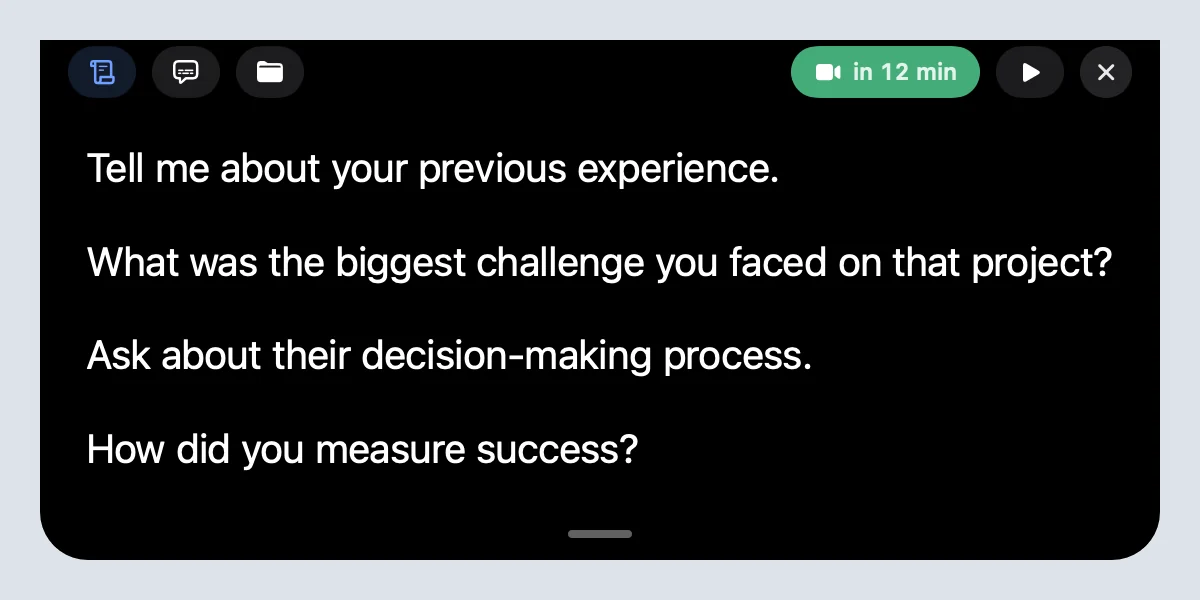
Cued is built for the half hour before a call and the call itself. Each calendar meeting gets a workspace for talking points, documents, images, videos and links, and links in the invite are added automatically. Thirty minutes before the call, the MacBook notch shows that meeting's points, files and a Join button, and the notch is hidden from screen sharing. The teleprompter scrolls on its own; it does not follow your voice. Cued then records the call with no bot and writes a summary and follow-up on your Mac. Press ⌥S to find a time and create a Google Calendar event with a Meet link (this needs Google sign-in). What it does not do: it does not write the brief itself ("Prepare me" gives you a prompt to use with an AI assistant), it does not read your email or chat apps, it does not share with a team, and it runs only on Apple silicon Macs with macOS 15 or later. It is designed for MacBooks with a notch, and there is no free plan.
Questions
How do I stop joining calls cold when my meetings are back to back?
Put everything for a meeting in one place before the day starts: the link, the files and three points you want to make. Then use a tool that surfaces them a few minutes before the call, such as a menu bar join button in Notion Calendar or Fantastical, or Cued's notch.
Is Cron still available?
Cron became Notion Calendar in January 2024. Existing Cron users were moved to Notion Calendar, which is free.
Does Cued write a meeting brief for me?
Not directly. "Prepare me" reads the websites in the invite and writes a research prompt about the people, company, questions and talking points. You paste it into the AI assistant you prefer. Granola's Business plan writes short briefs automatically instead.
How much does Cued cost?
Cued is a one-time purchase: $9 for the first 50 founding members, then $29 with a year of updates. Download it from getcued.pro and pay inside the app after a quick setup.
Try Cued on your next call. Your script in the notch, your call recorded and summarised on your Mac.
Download for Mac